Android
Target audience: engineers doing secondary development who need to connect Android clients with DejaOS devices for video intercom.
1. Background and Context
This solution uses a cross-client intercom model centered around DejaOS devices. The Android demo is a companion endpoint:
- DejaOS devices are call targets identified by fixed serial numbers (
serial no). - Android acts as a mobile/indoor endpoint and establishes sessions with DejaOS devices through a private signaling service.
- Media is carried by WebRTC, while signaling is carried by a private WebSocket protocol.
From an implementation perspective, the Android demo:
- Uses Google WebRTC (
org.webrtc.*) for Offer/Answer/ICE and media transport. - Uses private WebSocket signaling to create calls, start calls, disconnect, and exchange auxiliary messages.
So the intercom flow can be split into two paths:
- Signaling path: who calls whom, session state, and negotiation parameters (via WebSocket).
- Media path: audio/video and DataChannel data (via PeerConnection).
2. Value and Role of the Android Demo
The Android demo is mainly for three purposes:
- Demonstrate the minimal end-to-end intercom flow between Android and DejaOS.
- Provide a runnable "signaling + WebRTC" reference to shorten integration cycles.
- Provide entry points for multiple scenarios (live, playback, download, MJpeg) for capability verification and joint debugging.
High-level architecture:
- App layer (
com.rhrtc.webrtcsdk): page interaction, business parameter assembly, signaling send/receive. - Core layer (
com.rhrtc.webrtc): WebRTC connection, media tracks, ICE handling, recording, utilities. - Global connection layer (
APPAplication): shared WebSocket client and global message dispatch.
3. Code Structure and Responsibilities
Java packages are under app/src/main/java/com/rhrtc, mainly in two layers.
3.1 com.rhrtc.webrtcsdk (Business/UI Layer)
APPAplication- Global
Application, responsible for:- Generating local ID (
ownid) - Holding target device ID (
peerid) - Building WebSocket URL:
ws://<host>/wswebclient/<ownid> - Managing
JWebSocketClientlifecycle - Maintaining
WebSocketMsgCallbacklisteners and dispatching signaling to activities
- Generating local ID (
- Global
MainActivity- Feature entry page: Real video / Remote Play / Download / MJpeg video
RealVideoActivity,RemotePlayActivity,MjpegVideoActivity,DownLoadActivity- Scenario pages that:
- Send
__connectto/__call - Handle
_create/_offer/_ice_candidateand other responses - Trigger offer/answer/candidate logic in
PeerConnectionClient
- Send
- Scenario pages that:
WebSocketMsgCallback- Callback interface for WebSocket messages; decouples global connection and page logic
3.2 com.rhrtc.webrtc (Media and Network Core Layer)
PeerConnectionClient- Core WebRTC wrapper:
PeerConnectionFactory, track management, Offer/Answer, ICE, stats, recording hooks
- Core WebRTC wrapper:
JWebSocketClient- Client wrapper based on
org.java_websocket
- Client wrapper based on
record/*- Recording pipeline: audio interception, video frame dump, recorder implementation
utils/*- Utilities for audio route, Bluetooth, permissions, EGL, constraints, etc.
4. Runtime Flow (Android Side)
4.1 Startup Phase
APPAplication.onCreate()initializesownid,peerid, andwsurl.- Creates the WebSocket client and connects to the signaling service.
- Activities register
WebSocketMsgCallbackto receive global signaling callbacks.
4.2 Call Setup Phase (Typical Live Video)
- The page sends
__connecttoto request session creation. - The server returns
_create, including online state andiceServers. - The page sends
__call, declaring mode (live/play) and media/DataChannel parameters. - Both sides exchange
_offer/__answer(or__offer/_answer, depending on initiator). - Both sides continuously exchange
__ice_candidate/_ice_candidateuntil connected. - After media stabilizes, the call enters active state.
4.3 End Phase
- Either side sends a disconnect event (
__disconnectedor_session_disconnected). - The page clears PeerConnection, renderer, and session state.
5. Key Parameters
5.1 Identity and Target Parameters
ownid- Local Android ID; currently generated as random UUID.
- Reason: unlike DejaOS devices, Android/H5 does not require fixed hardware-serial registration; session-level random identity can be used.
peerid- Target DejaOS device ID, essentially the device serial number.
- Must match the actual target serial number; otherwise signaling may connect but the device cannot be called correctly.
sessionId- Unique ID for one call session, used throughout create/call/ICE/disconnect.
5.2 Signaling Service Address Parameter
wsurl- The sample project uses our test service by default.
- Android/H5 connects to signaling over WebSocket (WebSocket port).
- DejaOS devices use a lower-level protocol stack and do not use WebSocket. Therefore, DejaOS and Android/H5 port differences are expected by design.
5.3 Media and Business Parameters (__call)
mode:live(real-time) orplay(playback)source:- usually
MainStream/SubStreamforlive - usually playback file name for
play
- usually
audio/video/datachannel:- The protocol supports multiple representations (for example, direction strings or boolean semantic mapping).
- Common values in current Android demo:
audio="sendrecv",video="recvonly",datachannel="true". - Use server compatibility rules as final authority during integration.
iceservers: ICE list provided by server or injected by business side
6. Call Direction in Device-Led Scenarios
In production, even when "DejaOS device initiates Android interaction", the common implementation is not direct device-to-Android call setup:
- DejaOS device notifies backend through existing channels (incoming call / alarm / doorbell events).
- Backend then notifies Android client.
- Android client places a reverse call with
peerid = device serial no.
From signaling behavior, Android is often the actual connection initiator, while the device acts as the stable identified call target.
7. Debugging Recommendations (Android)
- First confirm WebSocket is connected and
peeridis reachable (online status from_create.state). - First pass should use minimal chain:
live + MainStream + audio/video=true, then add DataChannel/playback features. - If there is signaling but no video:
- check whether ICE exchange continues;
- check whether
iceServersis valid and whether UDP is restricted; - then check codec and renderer configuration.
- If messages arrive but state does not advance, first check event-name direction (
__xxxvs_xxx) for send/receive inversion.
8. Sample Source and APK
- Android sample source (GitHub):
- Prebuilt APK download (GitHub):
9. Debug Screenshot (Android + DejaOS)
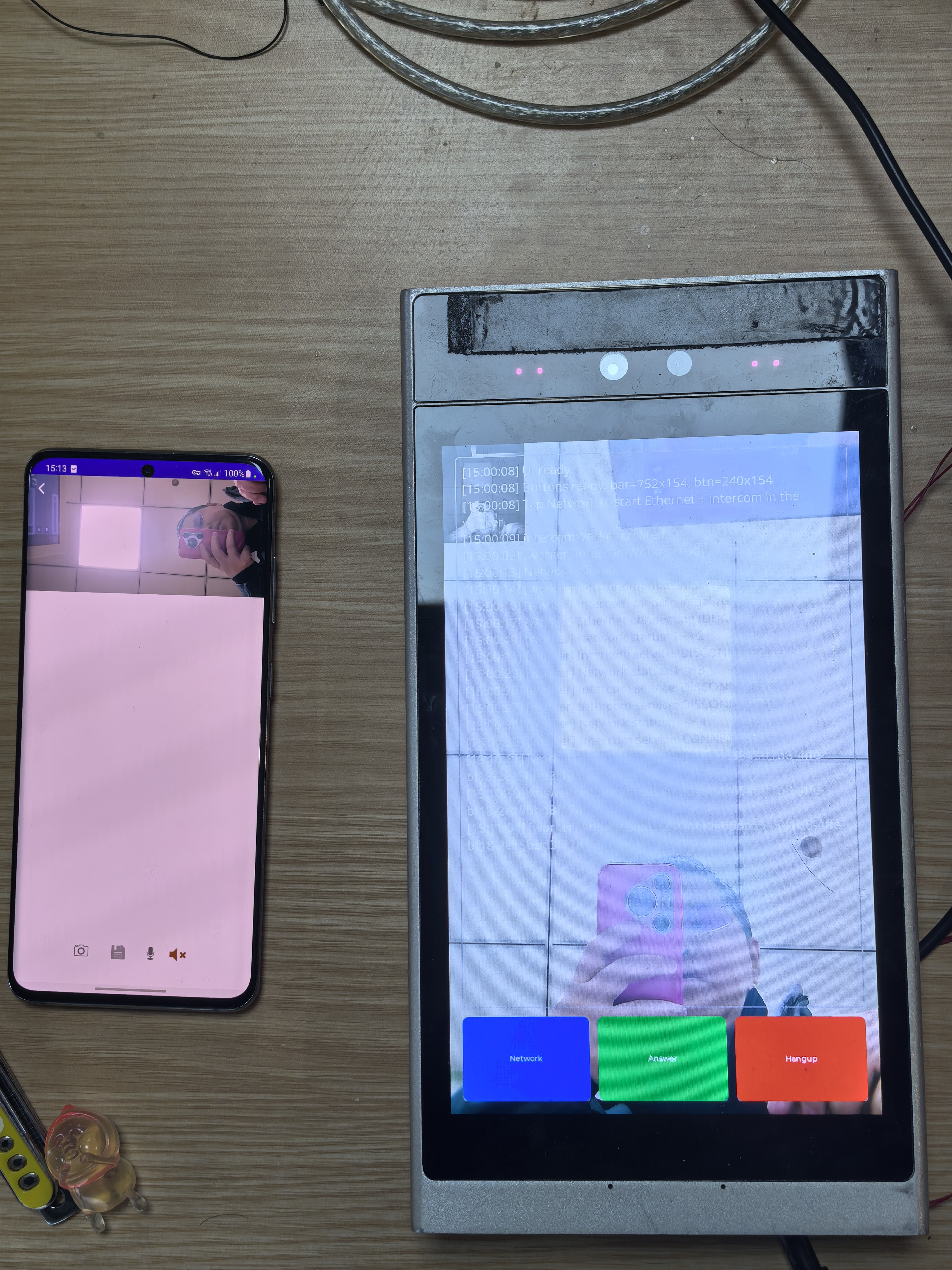
Appendix A: WebSocket Signaling Protocol
Conventions:
- The event names below are private WebSocket signaling protocol events provided by vendor, shared by all non-DejaOS clients (Android/H5, etc.).
- Double-underscore prefix
__generally means client -> server active send. - Single-underscore prefix
_generally means server/peer -> client push. - Field naming prioritizes runtime compatibility (for example, coexistence of
labelandsdpMLineIndex); always follow actual server behavior during integration. - This appendix describes protocol layer rules; Android/H5 can differ in concrete field values, with server compatibility rules taking precedence.
A.1 Common Data Structure
Most events include these fields in data:
sessionId: session IDsessionType: session type, value agreed by client type and server (for exampleapp,IE)messageId: unique message ID (UUID recommended)from: sender IDto: target ID
A.2 Main Setup Flow (Common Path Where Device Sends Offer)
1) Create Session Request: __connectto
{
  "eventName": "__connectto",
  "data": {
    "sessionId": "xxx",
    "sessionType": "IE",
    "messageId": "xxx",
    "from": "meid",
    "to": "peerid"
  }
}
2) Server Returns Create Result: _create
{
  "eventName": "_create",
  "data": {
    "sessionId": "xxx",
    "sessionType": "IE",
    "messageId": "xxx",
    "from": "meid",
    "to": "peerid",
    "state": "online",
    "iceServers": []
  }
}
state:online/offlineiceServers: used later to build PeerConnection
3) Send Call Parameters: __call
{
  "eventName": "__call",
  "data": {
    "sessionId": "xxx",
    "sessionType": "IE",
    "messageId": "xxx",
    "from": "meid",
    "to": "peerid",
    "mode": "live",
    "source": "MainStream",
    "datachannel": true,
    "audio": true,
    "video": true,
    "user": "admin",
    "pwd": "123456",
    "iceservers": "[]"
  }
}
4) Receive Offer: _offer
{
  "eventName": "_offer",
  "data": {
    "sessionId": "xxx",
    "sessionType": "IE",
    "messageId": "xxx",
    "from": "meid",
    "to": "peerid",
    "type": "offer",
    "sdp": "v=0...",
    "state": "optional"
  }
}
5) Return Answer: __answer
{
  "eventName": "__answer",
  "data": {
    "sessionId": "xxx",
    "sessionType": "IE",
    "messageId": "xxx",
    "from": "meid",
    "to": "peerid",
    "type": "answer",
    "sdp": "v=0..."
  }
}
6) Exchange ICE Candidates
Client send:
{
  "eventName": "__ice_candidate",
  "data": {
    "sessionId": "xxx",
    "sessionType": "IE",
    "messageId": "xxx",
    "to": "peerid",
    "from": "meid",
    "label": 0,
    "candidate": "candidate:..."
  }
}
Client receive:
{
  "eventName": "_ice_candidate",
  "data": {
    "sessionId": "xxx",
    "sessionType": "IE",
    "messageId": "xxx",
    "to": "peerid",
    "from": "meid",
    "sdpMLineIndex": 0,
    "candidate": "candidate:..."
  }
}
A.3 Reverse Offer Path (Client Sends Offer First)
This protocol supports a client-first Offer path. Key differences:
- Client creates local Offer first, then starts negotiation.
- The peer returns Answer.
- ICE exchange logic remains the same.
- Same
sessionId/messageIdmechanism is reused.
Android keeps a __offer branch to support different initiator flows.
A.4 Signaling Pass-Through Messages (Non-SDP/ICE)
Note: these are protocol capabilities; Android demo may not use all of them in its main path.
Device -> Client: _equipment_message
{
  "eventName": "_equipment_message",
  "data": {
    "sessionId": "xxx",
    "sessionType": "IE",
    "messageId": "xxx",
    "to": "peerid",
    "from": "meid",
    "message": {}
  }
}
Client -> Device: __post_message
{
  "eventName": "__post_message",
  "data": {
    "sessionId": "xxx",
    "sessionType": "IE",
    "messageId": "xxx",
    "to": "peerid",
    "from": "meid",
    "message": {}
  }
}
Ack: _post_message (contains result; field details follow actual server response).
A.5 DataChannel Messages
Unified payload shape in this document:
{
  "type": "xxx",
  "data": {}
}
Recommended usage:
typeas business action name (for exampleptz,unlock,heartbeat)datafor concrete parameters- add timestamps/signatures at business layer if needed
A.6 Disconnect Flow
Device-triggered Disconnect: _session_disconnected
{
  "eventName": "_session_disconnected",
  "data": {
    "sessionId": "xxx",
    "sessionType": "IE",
    "messageId": "xxx",
    "to": "peerid",
    "from": "meid",
    "message": {}
  }
}
Client-triggered Disconnect: __disconnected
{
  "eventName": "__disconnected",
  "data": {
    "sessionId": "xxx",
    "sessionType": "IE",
    "messageId": "xxx",
    "to": "peerid",
    "from": "meid"
  }
}
A.7 Core Event Names Currently Used in Android Code
- Active send:
__connectto,__call,__offer,__answer,__ice_candidate,__disconnected - Passive receive:
_create,_offer,_ice_candidate,_session_disconnected,_post_message
These map directly to this appendix for integration checks and packet-level debugging.
A.8 Business Extension Events in Android Demo (Non-Core RTC)
- Active send:
__subscribe,__play,__download - Note: these events are for business extensions (subscribe/playback/download) and do not affect core RTC setup flow.
Android
Additional Android-specific video intercom topics (beyond the overview) will be added here.