Video Intercom System Overview
1. What is video intercom?
Video intercom enables real-time video + voice calls between an outdoor station (door device), an indoor unit, and a mobile app.
A typical scenario:
- A visitor presses the doorbell / triggers an intercom request on the outdoor device
- The mobile app or indoor unit rings
- The user sees the visitor and talks to them
- The user confirms and opens the door using the app or indoor unit
From a system perspective, the whole process is essentially a real-time audio/video call: setup → talk → hang up.
2. What roles are in the system?
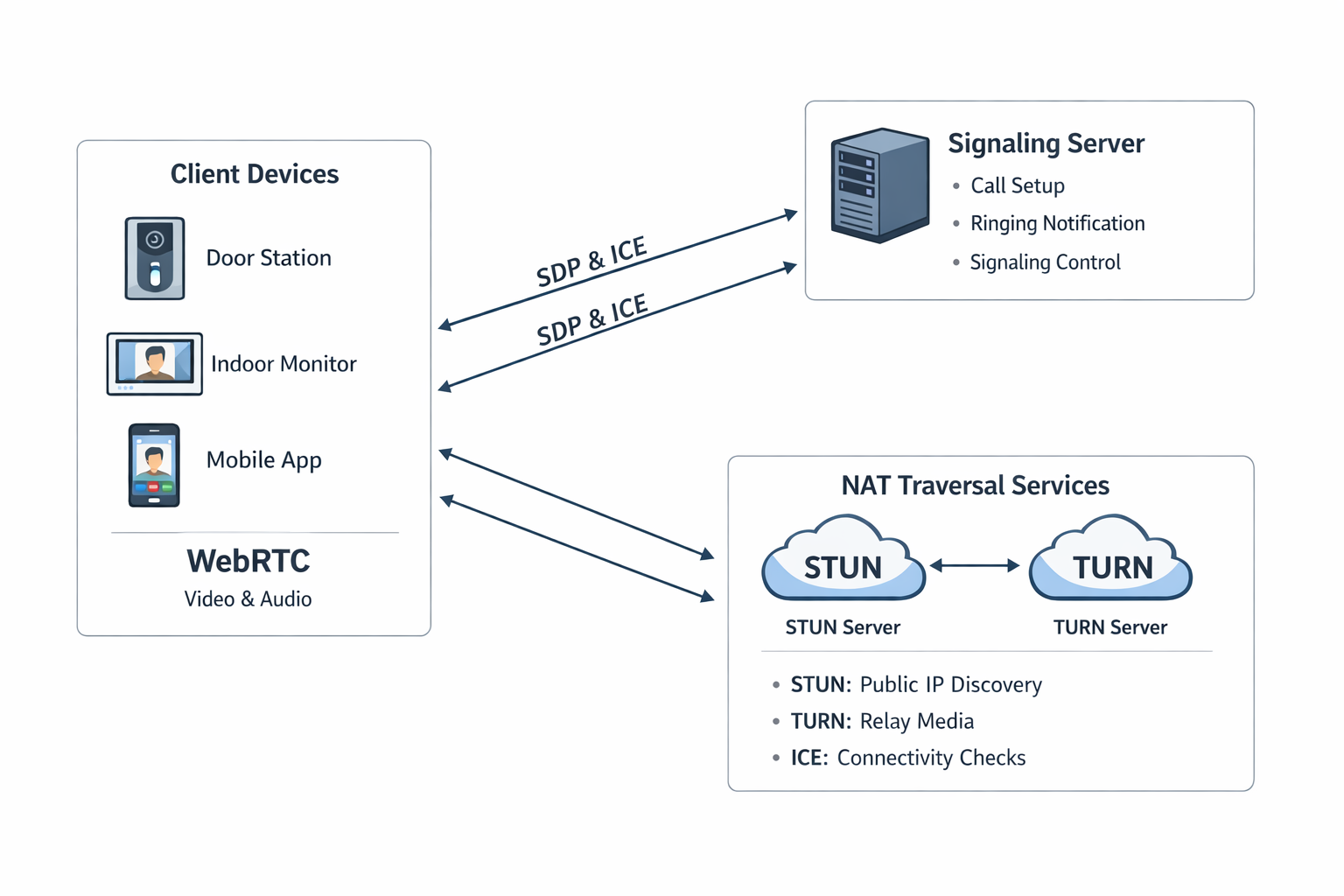
A complete video intercom system typically includes three roles.
-
Endpoints (what you see and operate)
- Outdoor station (with camera)
- Indoor unit (screen)
- Mobile app
They are responsible for:
- Capturing video/audio (camera, microphone)
- Playing remote audio and rendering remote video
- Starting / answering calls
-
Signaling server (call coordinator)
It does not carry audio/video media. It coordinates call setup, for example:
- A wants to call B; the server helps both sides join the same call session
- The server notifies B: an incoming call
- After negotiation completes, the media channel starts transmitting
-
NAT traversal (solve “cannot connect”)
Real networks are complicated (home Wi‑Fi, carrier networks, firewalls / NAT). Devices often cannot reach each other directly.
In that case:
- STUN helps a device learn “what address it appears as on the public internet”, enabling a direct connection attempt
- TURN relays audio/video through a server when direct connectivity is not possible
Intuition:
- Direct connection: the two sides talk “directly”
- TURN: a middle relay forwards the media packets
3. What happens during a call?
The simplest flow for a typical call:
- The user presses the doorbell
- The outdoor device notifies the signaling server
- The signaling server notifies the mobile app / indoor unit
- The user answers
- The two endpoints establish a connection
- Real-time video + voice starts
- Hang up, end the session
One sentence summary:
- Signaling “calls the person”
- RTC (the real-time A/V channel) “carries the conversation”
4. Why WebRTC?
WebRTC is a mainstream real-time audio/video technology stack. In intercom scenarios, common benefits include:
- Low latency (good for conversations)
- Peer-to-peer support, and the ability to extend to media-forwarding topologies when needed
- Built-in network adaptability to help establish connectivity across NAT
For secondary development, the key is integrating your business flow into call setup and media transport, rather than re-implementing RTC fundamentals from scratch.
5. Three parts (engineering view)
When you start implementation, you typically focus on:
-
Client (device / app)
- Camera / microphone input
- Video encoding/decoding (e.g. H.264 / H.265)
- Rendering remote video and playing remote audio
- Running a WebRTC engine or integrating an RTC SDK
-
Signaling server
- Authentication / login (who is allowed to initiate)
- Call routing (who calls whom; session binding to a room/call ID)
- Relaying call control messages (invite, answer, hang up, etc.)
-
NAT traversal (STUN / TURN)
- Improve connection success rate
- Provide a fallback path in complex networks
6. Two device lines
We provide two device lines:
At a high level:
- Android devices: open, general-purpose, developed like a normal Android phone
- DejaOS devices: lightweight, customizable, deeply integrated with device capabilities
This topic will focus on Linux + DejaOS devices, and how to implement video intercom business flows and UI on-device with JavaScript.
Android vs DejaOS (quick comparison)
| Item | Android 11 devices | Linux + DejaOS devices |
|---|---|---|
| OS | Stock Android 11 | Linux + DejaOS Runtime |
| Video (two-way / one-way) | Two-way | One-way |
| Audio (two-way / one-way) | Two-way | Two-way |
| WebRTC library | Google WebRTC / 3rd‑party RTC SDKs (e.g. Agora) | DejaOS modules such as dxIntercom, dxDisplay, dxAudio, dxFacial, etc. |
| Signaling service | No restriction (self-hosted or third‑party) | Must use the signaling service we provide |
| TURN/STUN service | No restriction (self-hosted or third‑party) | No restriction; you can also use the service we provide (integrated with signaling) |
| Device ↔ signaling interface | Developer-defined (commonly WebSocket / MQTT / TCP, etc.) | Video intercom module APIs (to be documented) |
| Indoor unit ↔ signaling interface | Developer-defined (commonly WebSocket / MQTT / TCP, etc.) | WebSocket-only private protocol |
1. Android devices (overview)
Our devices run stock Android 11 and follow the standard Android HAL model. You can treat them as high-performance Android terminals with industrial interfaces (UART / GPIO, etc.).
Developing on the device is no different from developing on an Android phone:
- An app built for Android phones can typically be installed on the device
- An app built on the device can typically be installed on an Android phone (as long as it does not depend on specific industrial peripherals)
We have validated two mainstream RTC approaches on our hardware:
- Native WebRTC library integration: Using Google’s Android WebRTC stack to achieve low-latency bidirectional A/V calls.
- Agora SDK integration: Integrated Agora.io; hardware encoding/decoding (H.264 / H.265) and AEC are stable in our tests, and the development experience is close to a normal phone app.
In short: Android video intercom development is the same as normal Android phone development. The main trade-off is that Android devices are typically more expensive than DejaOS devices.
2. Linux + DejaOS devices
For DejaOS devices, the ecosystem is more integrated and development is done against the provided modules. The advantages are lower device cost and a simpler development model: you can implement a complete intercom flow by calling the relevant components from JavaScript.
The DejaOS video intercom capabilities (API reference, sample projects, signaling integration, and UI integration patterns) will be expanded in follow-up documents.