Canvas Demo
This DejaOS SDK 4.0 example demonstrates the public dxui.Canvas component introduced in dxUi 2.0.6. It presents six focused test groups on one screen so developers can compare the API calls with their rendered results.
This project is an API validation and usage-reference demo. Its layout favors clear function coverage over production UI design.
UI Preview
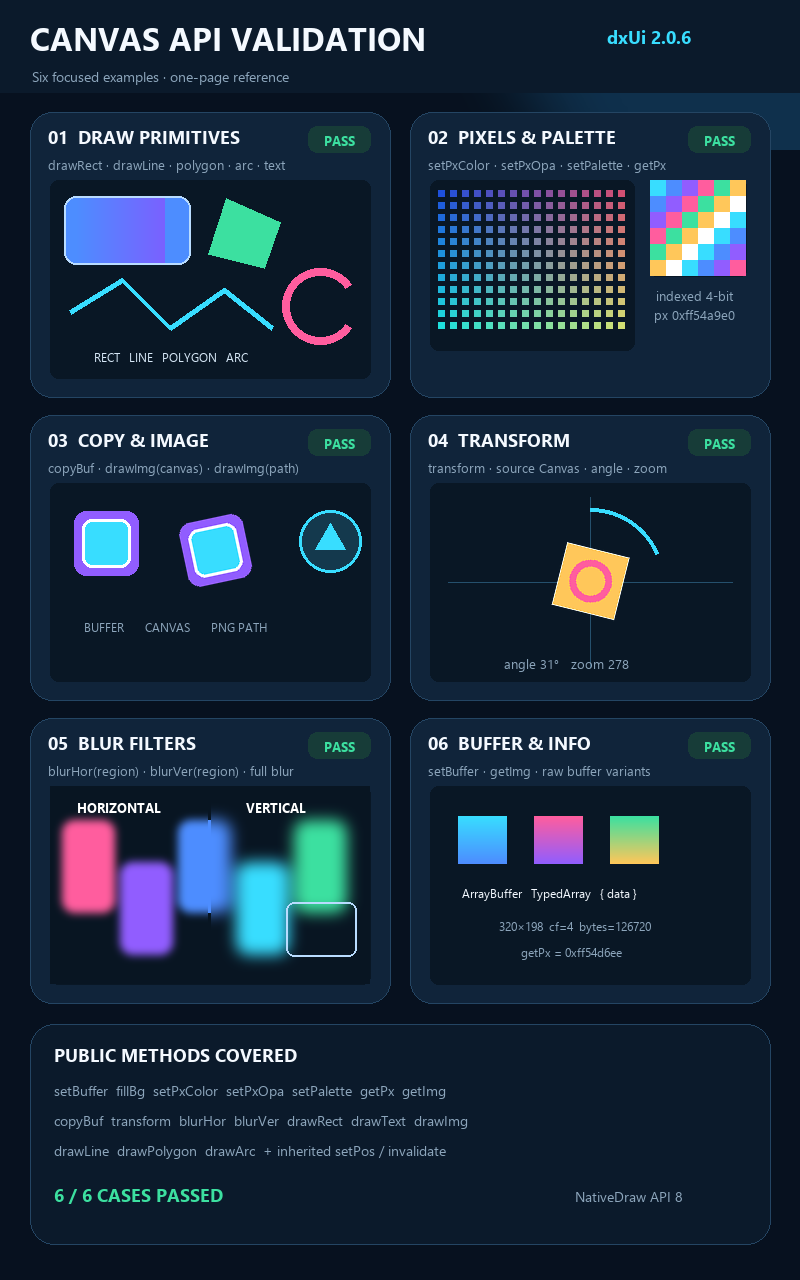
The image above is a simulated 800 × 1280 device screenshot based on the implemented interface rather than a photograph captured from the physical display.
What the Demo Covers
- Drawing primitives: Rectangles, connected lines, convex polygons, arcs, and text.
- Pixel and palette access: Per-pixel color and opacity changes, indexed-color palettes, and pixel reads.
- Buffers and images: Canvas-to-canvas copies, raw buffers, image descriptors, and image-file drawing.
- Transforms: Rotation, zoom, pivot positioning, destination offsets, and antialiasing.
- Blur filters: Horizontal and vertical blur applied to either a selected region or the complete canvas.
- Canvas information: Buffer resizing and access to the current LVGL image descriptor.
Main Canvas Functions
| Function | Purpose |
|---|---|
dxui.Canvas.build(id, parent) | Creates a Canvas component under the specified parent. |
setBuffer(width, height, colorFormat) | Allocates the Canvas pixel buffer and selects its LVGL color format. |
fillBg(color, opacity) | Fills the complete Canvas with a color and optional opacity. |
drawRect(x, y, width, height, drawDsc) | Draws a rectangle using a native rectangle descriptor, including radius, border, gradient, and shadow settings. |
drawLine(points, drawDsc) | Draws a line through an ordered array of points. |
drawPolygon(points, drawDsc) | Draws a convex polygon. Points must follow the polygon perimeter in order. |
drawArc(x, y, radius, startAngle, endAngle, drawDsc) | Draws an arc between the supplied angles using an arc descriptor. |
drawText(x, y, maxWidth, drawDsc, text) | Renders text inside the specified maximum width. |
drawImg(x, y, source, drawDsc) | Draws an image from a Canvas or runtime image path with an image descriptor. |
setPxColor(x, y, color) / setPxOpa(x, y, opacity) | Changes the color or opacity of an individual pixel. |
setPalette(index, color) | Sets an entry in the palette of an indexed-color Canvas. |
getPx(x, y) / getImg() | Reads a pixel value or returns the current image descriptor. |
copyBuf(source, x, y, width, height) | Copies Canvas or raw pixel-buffer data into a destination region. |
transform(source, angle, zoom, offsetX, offsetY, pivotX, pivotY, antialias) | Rotates and scales a source image. The angle uses 0.1-degree units and zoom value 256 represents 100%. |
blurHor(...) / blurVer(...) | Applies horizontal or vertical blur to the full Canvas or a selected rectangular region. |
Canvas also inherits common component methods from uiBase, such as setPos(), setSize(), and invalidate().
Minimal Usage
const canvas = dxui.Canvas.build('canvas', root)
canvas.setBuffer(320, 200, dxui.Utils.ENUM.LV_IMG_CF_TRUE_COLOR)
canvas.setPos(20, 80)
canvas.fillBg(0x091725)

canvas.drawLine(
  [[20, 120], [80, 60], [150, 130]],
  lineDescriptor
)
canvas.invalidate()
Drawing descriptors such as lineDescriptor are created through dxui.Utils.GG.NativeDraw. Initialize dxUi before building the Canvas and keep the normal dxui.handler() timer running.
Usage Notes
drawPolygon()supports convex polygons only; concave and self-intersecting point lists are not valid inputs.- When copying from another Canvas with
copyBuf(), the source and destination color formats must match. - Runtime image paths use the
/app/code/resource/...form. - Canvas buffers consume device memory, and large frequently redrawn regions use significant CPU time. Keep animated regions small and reuse drawing descriptors where possible.
Source Code
Complete source: DejaOS repository · apps/features/canvas_demo
Build and Run
dejaos install
dejaos run
Tip: This example uses dxUi 2.0.6, DejaOS SDK 4.0, and an 800 × 1280 portrait layout. Adjust Canvas sizes and coordinates for other display resolutions.