dxHttpServer
1. Overview
This module is part of the official system module library of dejaOS, used to start an HTTP Web service, listen on ports, and allow clients to access the device through the HTTP protocol. It is typically used to control devices through a computer browser within a local area network, provided that the device's IP address is known. Includes common HTTP Web service features:
- Static Web Service
- Service Listening and Startup
- Route Registration
- Supports file upload via both raw body (e.g., 'application/octet-stream') and multipart form data ('multipart/form-data').
- Supports file download
- Multi-threading not supported, all functions should run in a single thread. For cross-thread communication, use dxEventbus to pass data
2. Files
- dxHttpServer.js
- libvbar-m-dxhttpcserver.so (embedded mongoose)
- Ensure these 2 files are included in the dxmodules subdirectory under the project root directory
3. Dependencies
- None
4. Compatible Devices
Compatible with all devices running dejaOS v2.0+
5. API Reference
Core Lifecycle & Server Control
httpserver.init(): Initializes the server instance. Called automatically by other functions, so explicit calls are often unnecessary.httpserver.deinit(): Deinitializes the server and releases resources.httpserver.listen(port): Starts the HTTP server and makes it listen for connections on the specified port.httpserver.loop(): Processes incoming requests and events. This function must be called periodically in a loop (e.g.,setInterval).
Routing
-
httpserver.route(path, callback): Registers a handler for a specific URL path.path(String): The URL path. Supports exact matches (e.g.,'/hello') and wildcard matches (e.g.,'/api/*').callback(Function): A function(req, res)that handles the request.req: The request object.res: The response object.
-
httpserver.serveStatic(pathPrefix, directory): Serves static files from a local directory.pathPrefix(String): The URL prefix to map to the static directory (e.g.,/static).directory(String): The absolute path to the local directory containing the files (e.g.,/app/code/web).
Request Object (req)
The req object passed to the route callback contains:
req.method: (String) The HTTP method (e.g., 'GET', 'POST').req.url: (String) The full request URL.req.query: (String) The query string part of the URL.req.headers: (Object) An object containing request headers.req.body: (String|ArrayBuffer) The request body for raw uploads.req.saveFile(path): (Function) Saves a raw request body (e.g., from 'application/octet-stream') to the specified file path. Returnstrueon success.req.saveMultipartFile(path): (Function) Handles a 'multipart/form-data' upload. It saves the first file part to the specifiedpathand returns an object containing the other form fields.
Response Object (res)
The res object passed to the route callback has methods to send a response:
res.send(body, headers): Sends a response to the client.body(String|ArrayBuffer): The response body.headers(Object, Optional): An object of HTTP headers.
res.sendFile(path): Sends the content of a file as the response.
Examples
Handling a multipart/form-data upload:
// Example with curl:
// curl -X POST -F "file1=@/path/to/your/file.bin" \
//   -F "user=JohnDoe" -F "timestamp=1678886400" \
//   http://<device-ip>:8080/form-upload

httpserver.route("/form-upload", function (req, res) {
  try {
    const fields = req.saveMultipartFile("/app/code/data/uploaded_file.bin");
    // fields will be: { user: "JohnDoe", timestamp: "1678886400" }
    res.send(`File saved. User was ${fields.user}`);
  } catch (e) {
    res.send(`Error saving file: ${e}`, { "Content-Type": "text/plain" });
  }
});
Chunked upload for large files (small-memory devices):
The server buffers the entire request body in memory before invoking a route handler, and the internal receive buffer is capped at 3 MB. A single request larger than that will fail. To upload a large file (e.g. a firmware/upgrade package) on a memory-constrained device, slice the file on the client into chunks smaller than 3 MB, upload them one by one as raw body, and append each chunk to the target file on the server. Peak memory then stays at roughly one chunk regardless of the total file size.
Server side — append each chunk, verify once at the end:
import server from "../../dxmodules/dxHttpServer.js";
import dxos from "../../dxmodules/dxOs.js";
import dxCommonUtils from "../../dxmodules/dxCommonUtils.js";

const CHUNK_TMP = "/upgrades.chunk"; // single-chunk landing file (reused)
const TARGET = "/upgrades.zip"; // merged complete file

// Parse "index=0&total=8&md5=..." into an object
function parseQuery(query) {
  const out = {};
  if (!query) return out;
  query.split("&").forEach((kv) => {
    const i = kv.indexOf("=");
    if (i > 0) out[decodeURIComponent(kv.slice(0, i))] = decodeURIComponent(kv.slice(i + 1));
  });
  return out;
}

server.route("/uploadChunk", function (req, res) {
  const send = (code, message) =>
    res.send(JSON.stringify({ code, message }), { "Content-Type": "application/json" });
  try {
    const q = parseQuery(req.query);
    const index = parseInt(q.index, 10);
    const total = parseInt(q.total, 10);
    const md5 = q.md5;
    if (isNaN(index) || isNaN(total) || index < 0 || index >= total) {
      return send(400, "invalid chunk params");
    }

    // First chunk: remove any leftover from a previous (interrupted) upload
    if (index === 0) dxos.system(`rm -f ${TARGET} ${CHUNK_TMP}`);

    // Write this chunk's raw body to a temp file (each chunk < 3MB)
    if (!req.saveFile(CHUNK_TMP)) return send(400, "save chunk failed");

    // Append to the target file via shell — never loads the whole file into memory
    if (dxos.system(`cat ${CHUNK_TMP} >> ${TARGET}`) !== 0) return send(400, "append failed");
    dxos.system(`rm -f ${CHUNK_TMP}`);

    // Not the last chunk: ack and wait for the next one
    if (index < total - 1) return send(200, "chunk received");

    // Last chunk: verify the whole-file MD5
    const actual = dxCommonUtils.fs.fileMd5(TARGET); // returns a hex string
    if (typeof actual === "string" && actual.toLowerCase() === String(md5).toLowerCase()) {
      send(200, "upload success");
      // e.g. trigger upgrade / reboot here
    } else {
      dxos.system(`rm -f ${TARGET}`);
      send(400, "md5 verification failed");
    }
  } catch (e) {
    dxos.system(`rm -f ${TARGET} ${CHUNK_TMP}`);
    send(400, "upload chunk failed");
  }
});
Client side (browser) — slice with File.slice and upload each chunk in order:
async function uploadInChunks(file, md5, token) {
  const CHUNK_SIZE = 1 * 1024 * 1024; // 1MB, safely under the 3MB receive limit
  const total = Math.ceil(file.size / CHUNK_SIZE) || 1;
  for (let index = 0; index < total; index++) {
    const start = index * CHUNK_SIZE;
    const chunk = file.slice(start, Math.min(start + CHUNK_SIZE, file.size));
    const url = `http://<device-ip>:8080/uploadChunk?index=${index}&total=${total}&md5=${encodeURIComponent(md5)}`;
    // Upload chunks strictly in order (await each) — the server appends them sequentially
    const resp = await fetch(url, {
      method: "POST",
      headers: { "Content-Type": "application/octet-stream", Authorization: token },
      body: chunk,
    });
    const result = await resp.json();
    if (result.code !== 200) throw new Error(result.message);
    console.log(`chunk ${index + 1}/${total} done`);
  }
}
Notes:
- Keep
CHUNK_SIZEbelow 3 MB. 1 MB is a safe default (the server also makes an internal copy of the body, so peak memory is ~2× the chunk size).- Chunks must arrive in order — upload them serially (
awaiteach one) so the server'scat >>appends them correctly.- On failure or user cancel, have the client call a cleanup route (e.g.
rm -fthe target file) so a half-written package doesn't linger. Re-uploading fromindex=0also cleans up automatically.
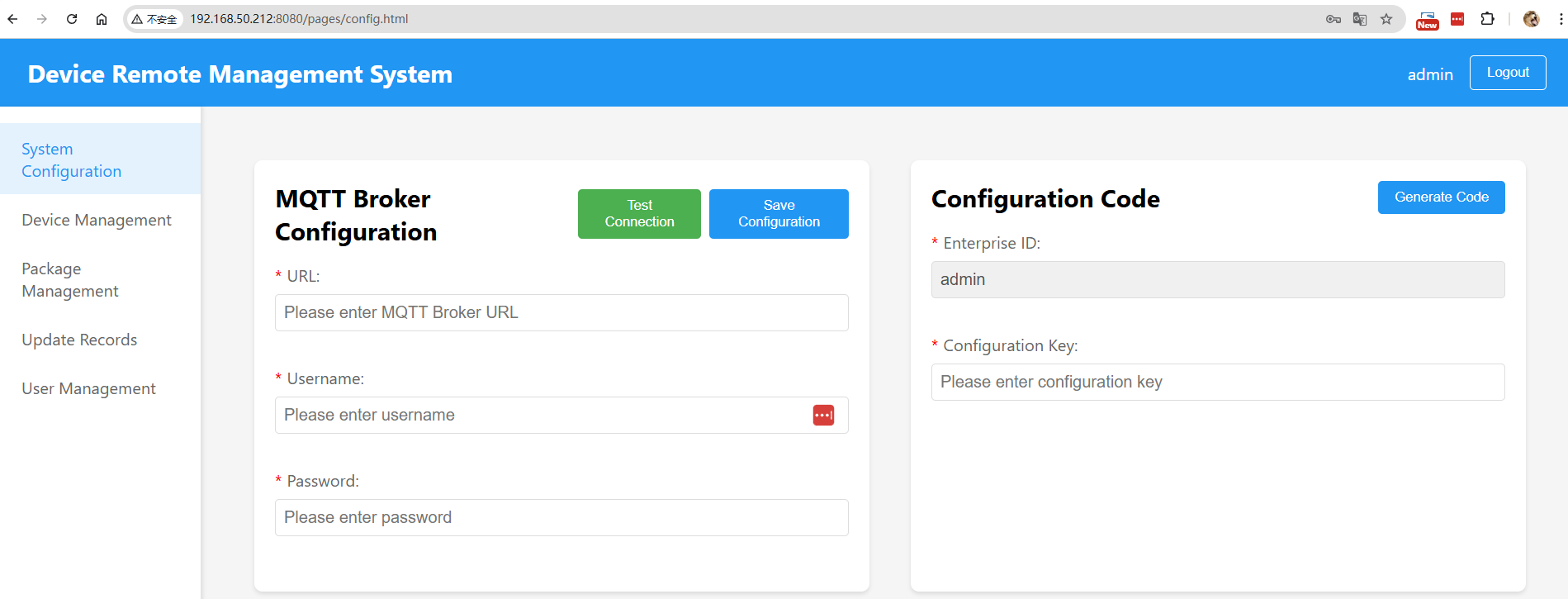
For more detailed usage, refer to Demo: demo/test_server.js,demo/web
scrrenshot as below: 192.168.50.212 is the device IP
6. Related Modules
Related to another module dxWebserver, with similar functionality. dxHttpServer is a replacement for dxWebserver, and dxWebserver is being gradually deprecated