dxTimeZones
1. Overview
This module is part of the official system module library of dejaOS, used for comprehensive timezone management with multi-language support. This module contains a curated list of 45 major timezones worldwide, each with UTC offset information and localized names in 9 languages (Chinese, English, Japanese, Korean, Spanish, French, German, Russian, Arabic). Additionally, it supports updating to any timezone file present in the zoneinfo directory, even if not included in the predefined list.
Main features include:
- Multi-Language Support: Each timezone includes translations in 9 languages for UI display.
- UTC Offset Information: Provides standardized UTC offset for each timezone.
- System Timezone Update: Allows updating the system timezone by copying zoneinfo files.
- Custom Timezone Support: Can update to any timezone file in the zoneinfo directory, not limited to the 45 predefined ones.
- Language Validation: Ensures only supported languages are used when filtering timezones.
- Device Reboot: Provides a safe reboot function to apply timezone changes.
Note
For simple timezone updates using GMT offset only (e.g., GMT+8, GMT-5), consider using the
updateGmt()function from the dxNtp module, which provides a simpler interface for basic GMT offset-based timezone configuration without requiring full zoneinfo files.
2. Files
dxTimeZones.jszoneinfo/directory (contains timezone data files)
- Ensure the
dxTimeZones.jsfile is included in the dxmodules subdirectory under your project root directory.- The zoneinfo directory should be located at
/app/code/dxmodules/zoneinfo/.
3. Dependencies
dxOs(for system commands)dxStd(for file system operations)dxLogger(for log output)
4. Compatible Devices
Compatible with all devices running dejaOS v2.0+.
5. Usage
Getting Timezones
import tz from "./dxmodules/dxTimeZones.js";
import logger from "./dxmodules/dxLogger.js";

// --- Get all timezones with full language data ---
const allTimezones = tz.getTimeZones();
// Returns: { "Pacific/Midway": { utc_offset: "-11:00", name: { zh: "...", en: "...", ... } }, ... }

// --- Get timezones filtered by language ---
const chineseTimezones = tz.getTimeZones("zh");
// Returns: { "Pacific/Midway": { utc_offset: "-11:00", name: "萨摩亚标准时间(中途岛)" }, ... }

const englishTimezones = tz.getTimeZones("en");
// Returns: { "Pacific/Midway": { utc_offset: "-11:00", name: "Samoa Standard Time (Midway)" }, ... }
Updating System Timezone
// --- Update system timezone (from predefined list) ---
try {
  tz.updateTimeZone("Asia/Shanghai");
  // Timezone file copied to /etc/localtime
  // Now reboot to apply changes
  tz.reboot();
} catch (e) {
  logger.error("Failed to update timezone:", e.message);
}

// --- Update to custom timezone (any file in zoneinfo directory) ---
try {
  tz.updateTimeZone("Europe/Kyiv"); // Not in predefined list, but file exists
  // Works as long as the file exists at /app/code/dxmodules/zoneinfo/Europe/Kyiv
  tz.reboot();
} catch (e) {
  logger.error("Timezone file not found:", e.message);
}
Language Validation
// --- Validate language support ---
try {
  tz.getTimeZones("invalid"); // Throws error
} catch (e) {
  // Error: Language invalid not supported
  logger.error(e);
}
6. API Reference
tz.getTimeZones(language)
Gets timezone information, optionally filtered by language.
- Parameters:
language(string, optional): Language code to filter timezone names. If not provided, returns all timezones with full multi-language data. Supported languages:zh,en,ja,ko,es,fr,de,ru,ar.
- Returns:
object- An object containing timezone data:- If
languageis provided:{ "timezone_key": { utc_offset: "...", name: "..." }, ... } - If
languageis not provided:{ "timezone_key": { utc_offset: "...", name: { zh: "...", en: "...", ... } }, ... }
- If
- Throws:
Error- If the language is not supported.
tz.updateTimeZone(timezoneKey)
Updates the system timezone by copying the corresponding zoneinfo file to /etc/localtime.
- Parameters:
timezoneKey(string, required): The timezone identifier (e.g.,"Asia/Shanghai","America/New_York"). Can be from the predefined list or any file in the zoneinfo directory.
- Returns:
void - Throws:
Error- If the timezone key is not provided or the timezone file is not found. - Note: The device must be rebooted for the change to take effect. Use
tz.reboot()after updating.
tz.reboot()
Safely reboots the device to apply timezone changes. This function syncs the file system and then triggers an asynchronous reboot after 2 seconds.
- Parameters: None
- Returns:
void - Note: This is a non-blocking operation. The device will reboot after a short delay.
Constants
tz.root
The root path to the zoneinfo directory. Default: "/app/code/dxmodules/zoneinfo/"
tz.languages
Array of supported language codes: ["zh", "en", "ja", "ko", "es", "fr", "de", "ru", "ar"]
7. Supported Timezones
The module includes 45 timezones covering major cities and regions worldwide:
- Americas: From Pacific/Midway (UTC-11) to America/Argentina/Buenos_Aires (UTC-3)
- Europe & Africa: From Atlantic/Azores (UTC-1) to Europe/Istanbul (UTC+3)
- Asia & Pacific: From Asia/Dubai (UTC+4) to Pacific/Tongatapu (UTC+13)
Supported Languages
zh: Chinese (中文)en: Englishja: Japanese (日本語)ko: Korean (한국어)es: Spanish (Español)fr: French (Français)de: German (Deutsch)ru: Russian (Русский)ar: Arabic (العربية)
8. Related Modules
This module is related to system time management:
- dxNtp: For simple GMT offset-based timezone updates (e.g., GMT+8), use
dxNtp.updateGmt(). For full timezone support with zoneinfo files, use this module.
9. Examples
Example 1: Display Timezones in UI
import tz from "./dxmodules/dxTimeZones.js";
import logger from "./dxmodules/dxLogger.js";

// Get timezones in Chinese for UI display
const timezones = tz.getTimeZones("zh");

// Display in a list
for (const [key, data] of Object.entries(timezones)) {
  logger.info(`${key}: ${data.name} (${data.utc_offset})`);
}
Example 2: Update Timezone Based on User Selection
import tz from "./dxmodules/dxTimeZones.js";
import logger from "./dxmodules/dxLogger.js";

function updateUserTimezone(timezoneKey) {
  try {
    logger.info(`Updating timezone to ${timezoneKey}...`);
    tz.updateTimeZone(timezoneKey);
    logger.info("Timezone updated successfully. Rebooting device...");
    tz.reboot();
  } catch (e) {
    logger.error(`Failed to update timezone: ${e.message}`);
  }
}

// Example usage
updateUserTimezone("Asia/Shanghai");
Example 3: Get Timezone List for Different Languages
import tz from "./dxmodules/dxTimeZones.js";
import logger from "./dxmodules/dxLogger.js";

// Get timezones in different languages
const timezonesZh = tz.getTimeZones("zh");
const timezonesEn = tz.getTimeZones("en");
const timezonesJa = tz.getTimeZones("ja");

// Example: Get Beijing timezone in different languages
logger.info("Beijing timezone:");
logger.info(`  Chinese: ${timezonesZh["Asia/Shanghai"].name}`);
logger.info(`  English: ${timezonesEn["Asia/Shanghai"].name}`);
logger.info(`  Japanese: ${timezonesJa["Asia/Shanghai"].name}`);
Example 4: Complete Timezone Settings Demo
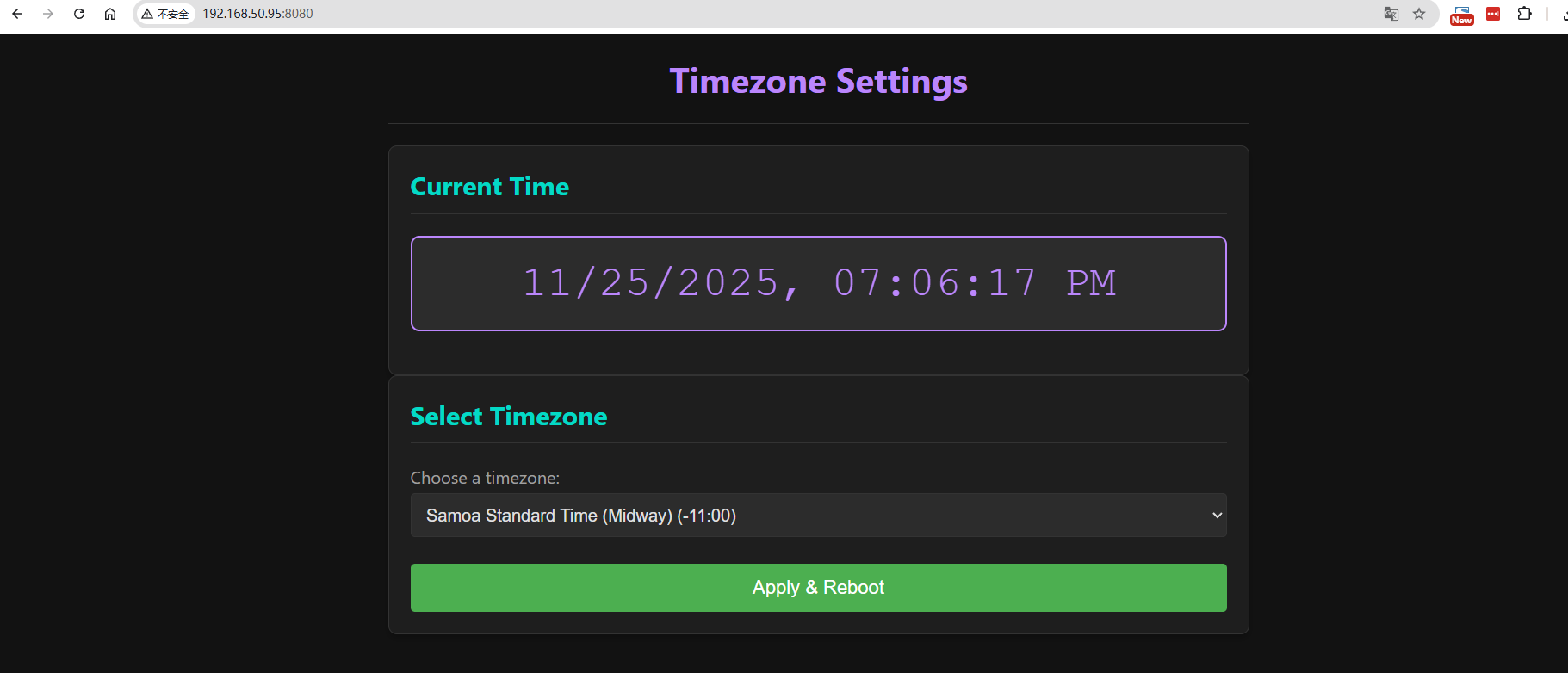
This example demonstrates a complete timezone settings interface with time display and timezone selection.