dxFingerZaz Fingerprint Module Documentation
Table of Contents
Module Introduction
dxFingerZaz is a JavaScript module for communicating with the Zaz fingerprint recognition module. This module communicates with fingerprint recognition hardware via UART (serial port) and provides complete fingerprint management functions, including fingerprint enrollment, verification, storage, and management operations.
Key Features
- Connection Test: Verify connection status with the fingerprint module
- Fingerprint Management: Get empty IDs, query enrollment status, delete fingerprint templates, count enrolled fingerprints
- Image Capture: Capture fingerprint images and detect finger placement
- Template Generation: Generate fingerprint templates from images and merge multiple templates
- Storage Operations: Store, load, upload, and download fingerprint templates
- Search and Match: Search for matching fingerprints in the fingerprint library
- System Configuration: Read and set module parameters, get device information
Technical Specifications
- Communication Method: UART serial communication
- Default Baud Rate: 115200-8-N-1
- Fingerprint Capacity: Default 5000 (configurable)
- Number of Buffers: 3 RAM buffers (Buffer 0-2)
- Timeout: Default 500ms (configurable)
Dependencies
dxStd.js- Standard library (for sleep and other operations)dxUart.js- UART serial communication moduledxCommon.js- Common utility functionsdxLogger.js- Logging module
Quick Start
1. Import Module
import dxFingerZaz from './js/dxFingerZaz.js';
2. Initialize Module
Before using any functions, you must first initialize the module and configure serial port parameters:
dxFingerZaz.init({
    id: 'fingerUart',              // Connection ID, default 'fingerUart'
    type: '3',                     // UART type, default '3'
    path: '/dev/ttySLB1',          // Serial port path, default '/dev/ttySLB1'
    baudrate: '115200-8-N-1',     // Baud rate configuration, default '115200-8-N-1'
    total: 5000,                   // Total fingerprint capacity, default 5000
    timeout: 500                   // Timeout in milliseconds, default 500
});
3. Test Connection
if (dxFingerZaz.test()) {
    console.log("Fingerprint module connected successfully");
} else {
    console.error("Fingerprint module connection failed");
}
4. Basic Usage Examples
Enroll Fingerprint
// 1. Get an empty fingerprint ID
const emptyId = dxFingerZaz.getEmptyId(1, 5000);
if (!emptyId) {
    console.error("No available fingerprint ID found");
    return;
}

// 2. Detect if finger is placed
if (!dxFingerZaz.fingerDetect()) {
    console.log("Please place your finger");
    return;
}

// 3. Capture fingerprint image (first time)
if (!dxFingerZaz.getImage()) {
    console.error("Failed to capture fingerprint image");
    return;
}

// 4. Generate template to Buffer 0
if (!dxFingerZaz.generate(0)) {
    console.error("Failed to generate template");
    return;
}

// 5. Prompt user to place finger again
console.log("Please place your finger again");

// 6. Capture fingerprint image (second time)
if (!dxFingerZaz.getImage()) {
    console.error("Failed to capture fingerprint image");
    return;
}

// 7. Generate template to Buffer 1
if (!dxFingerZaz.generate(1)) {
    console.error("Failed to generate template");
    return;
}

// 8. Merge two templates to Buffer 0
if (!dxFingerZaz.merge(2, 0)) {
    console.error("Failed to merge templates");
    return;
}

// 9. Store fingerprint template
if (dxFingerZaz.storeChar(emptyId, 0)) {
    console.log(`Fingerprint enrolled successfully, ID: ${emptyId}`);
} else {
    console.error("Failed to store fingerprint");
}
Verify Fingerprint
// 1. Detect finger
if (!dxFingerZaz.fingerDetect()) {
    console.log("Please place your finger");
    return;
}

// 2. Capture fingerprint image
if (!dxFingerZaz.getImage()) {
    console.error("Failed to capture fingerprint image");
    return;
}

// 3. Generate template
if (!dxFingerZaz.generate(0)) {
    console.error("Failed to generate template");
    return;
}

// 4. Search for match in fingerprint library
const matchedId = dxFingerZaz.search(0, 1, 5000);
if (matchedId) {
    console.log(`Fingerprint matched successfully, ID: ${matchedId}`);
} else {
    console.log("No matching fingerprint found");
}
API Call Flow
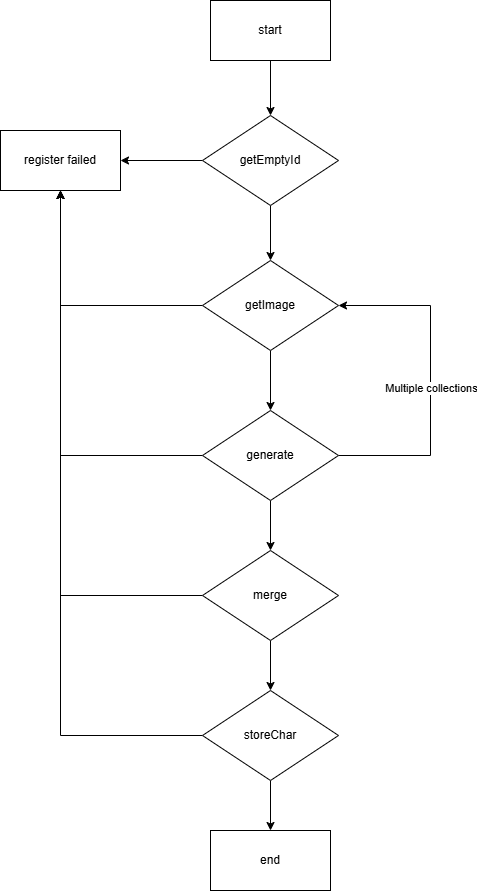
Register Fingerprint
Capture fingerprint and enroll. The module supports merging multiple captures to improve recognition success rate. It is recommended to capture 1-3 times. The API call flow is as follows (supports direct feature value saving):
Recognize Fingerprint
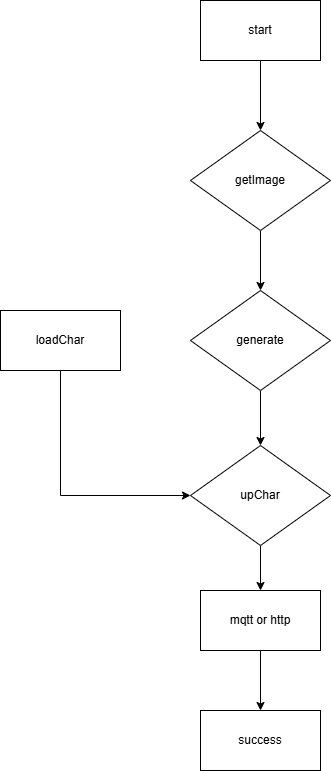
Upload Feature
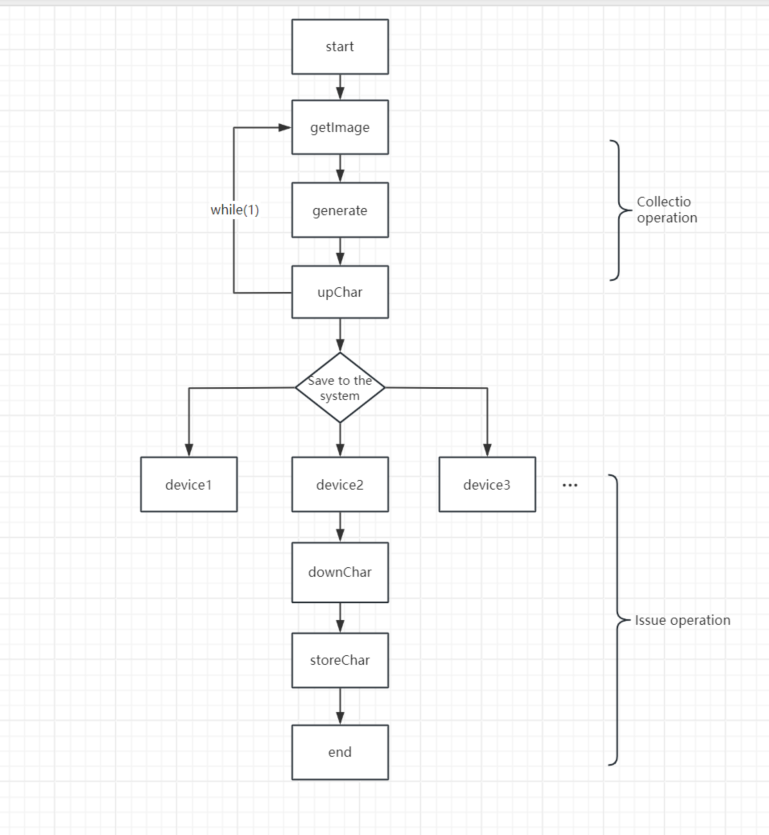
Feature Value Capture and Deploy to Multiple Devices
Download Template (from Host to Module)
Start
  ↓
Read template data (hex string)
  ↓
Download template to buffer (downChar)
  ↓
Store template (storeChar)
  ↓
End
API Documentation
Initialization
init(params)
Initialize the fingerprint module and configure serial port connection parameters.
Parameters:
| Parameter Name | Type | Required | Default Value | Description |
|---|---|---|---|---|
params.id | string | No | 'fingerUart' | Connection ID identifier |
params.type | string | No | '3' | UART type |
params.path | string | No | '/dev/ttySLB1' | Serial port device path |
params.baudrate | string | No | '115200-8-N-1' | Baud rate configuration |
params.total | number | No | 5000 | Total fingerprint capacity |
params.timeout | number | No | 500 | Timeout in milliseconds |
Return Value: None
Example:
dxFingerZaz.init({
    path: '/dev/ttyUSB0',
    baudrate: '9600-8-N-1',
    timeout: 1000
});
Connection Test
test()
Test whether the connection with the fingerprint module is normal.
Parameters: None
Return Value:
true- Connection successfulfalse- Connection failed
Example:
if (dxFingerZaz.test()) {
    console.log("Module connection normal");
}
Management Functions
getEmptyId(startId, endId)
Get the first empty fingerprint ID within the specified range.
Parameters:
| Parameter Name | Type | Required | Description |
|---|---|---|---|
startId | number | Yes | Start ID (1 to total) |
endId | number | Yes | End ID (1 to total) |
Return Value:
number- First empty fingerprint IDfalse- Operation failed
Example:
const emptyId = dxFingerZaz.getEmptyId(1, 5000);
if (emptyId) {
    console.log(`Found empty ID: ${emptyId}`);
}
getStatus(keyId)
Query the fingerprint enrollment status of the specified ID.
Parameters:
| Parameter Name | Type | Required | Description |
|---|---|---|---|
keyId | number | Yes | Fingerprint ID to query |
Return Value:
0- Not enrolled1- Enrolledfalse- Operation failed
Example:
const status = dxFingerZaz.getStatus(100);
if (status === 1) {
    console.log("This ID has enrolled fingerprint");
} else if (status === 0) {
    console.log("This ID has not enrolled fingerprint");
}
delChar(startId, endId)
Delete fingerprint templates within the specified range.
Parameters:
| Parameter Name | Type | Required | Description |
|---|---|---|---|
startId | number | Yes | Start ID (1 to total) |
endId | number | Yes | End ID (1 to total) |
Return Value:
true- Deletion successfulfalse- Deletion failed
Example:
// Delete single fingerprint
if (dxFingerZaz.delChar(100, 100)) {
    console.log("Deletion successful");
}

// Delete all fingerprints in range
if (dxFingerZaz.delChar(1, 100)) {
    console.log("Batch deletion successful");
}
getEnrollCount(startId, endId)
Get the number of enrolled fingerprints within the specified range.
Parameters:
| Parameter Name | Type | Required | Description |
|---|---|---|---|
startId | number | Yes | Start ID (1 to total) |
endId | number | Yes | End ID (1 to total) |
Return Value:
number- Number of enrolled fingerprintsfalse- Operation failed
Example:
const count = dxFingerZaz.getEnrollCount(1, 5000);
if (count !== false) {
    console.log(`Number of enrolled fingerprints: ${count}`);
}
getEnrolledIdList()
Get the list of all enrolled fingerprint IDs.
Parameters: None
Return Value:
Array- Data array of enrolled IDsfalse- Operation failed
Example:
const idList = dxFingerZaz.getEnrolledIdList();
if (idList) {
    console.log("List of enrolled IDs:", idList);
}
Image Processing
fingerDetect()
Detect whether a finger is placed on the sensor.
Parameters: None
Return Value:
1- Finger detected0- No finger detectedfalse- Operation failed
Example:
if (dxFingerZaz.fingerDetect() === 1) {
    console.log("Finger placed");
} else {
    console.log("Please place your finger");
}
getImage()
Capture fingerprint image from the sensor.
Parameters: None
Return Value:
true- Capture successfulfalse- Capture failed
Example:
if (dxFingerZaz.getImage()) {
    console.log("Image capture successful");
} else {
    console.error("Image capture failed, please place finger again");
}
Template Operations
generate(bufferNum)
Generate fingerprint template from the image buffer.
Parameters:
| Parameter Name | Type | Required | Description |
|---|---|---|---|
bufferNum | number | Yes | Buffer number (0-2) |
Return Value:
true- Generation successfulfalse- Generation failed
Example:
// Generate template to Buffer 0
if (dxFingerZaz.generate(0)) {
    console.log("Template generation successful");
}
merge(mergeCount, bufferNum)
Merge multiple fingerprint templates.
Parameters:
| Parameter Name | Type | Required | Description |
|---|---|---|---|
mergeCount | number | Yes | Number of templates to merge (2 or 3) 2: Merge Buffer 0 and Buffer 1 3: Merge Buffer 0, Buffer 1, and Buffer 2 |
bufferNum | number | Yes | Buffer number to store merged result (0-2) |
Return Value:
true- Merge successfulfalse- Merge failed
Example:
// Merge Buffer 0 and Buffer 1 to Buffer 0
if (dxFingerZaz.merge(2, 0)) {
    console.log("Template merge successful");
}
Storage Management
storeChar(keyId, bufferNum, overwrite)
Store template from buffer to fingerprint library.
Parameters:
| Parameter Name | Type | Required | Description |
|---|---|---|---|
keyId | number | Yes | Fingerprint ID |
bufferNum | number | Yes | Buffer number (0-2) |
overwrite | boolean | No | Whether to overwrite existing fingerprint (default false) |
Return Value:
true- Storage successfulfalse- Storage failed
Example:
// Store template without overwriting
if (dxFingerZaz.storeChar(100, 0)) {
    console.log("Storage successful");
}

// Store template with overwrite
if (dxFingerZaz.storeChar(100, 0, true)) {
    console.log("Storage and overwrite successful");
}
loadChar(keyId, bufferNum)
Load template from fingerprint library to buffer.
Parameters:
| Parameter Name | Type | Required | Description |
|---|---|---|---|
keyId | number | Yes | Fingerprint ID to load |
bufferNum | number | Yes | Target buffer number (0-2) |
Return Value:
true- Load successfulfalse- Load failed
Example:
// Load fingerprint with ID 100 to Buffer 0
if (dxFingerZaz.loadChar(100, 0)) {
    console.log("Load successful");
}
upChar(bufferNum)
Upload template from buffer to host.
Parameters:
| Parameter Name | Type | Required | Description |
|---|---|---|---|
bufferNum | number | Yes | Buffer number (0-2) |
Return Value:
string- Template data (hex string)false- Upload failed
Example:
const template = dxFingerZaz.upChar(0);
if (template) {
    console.log("Template data:", template);
    // Can save template to file or database
}
downChar(bufferNum, template)
Download template from host to buffer.
Parameters:
| Parameter Name | Type | Required | Description |
|---|---|---|---|
bufferNum | number | Yes | Buffer number (0-2) |
template | string | Yes | Template data (hex string) |
Return Value:
true- Download successfulfalse- Download failed
Example:
const templateData = "a1b2c3d4..."; // Template data read from file or database
if (dxFingerZaz.downChar(0, templateData)) {
    console.log("Download successful");
    // Then can use storeChar to store to fingerprint library
}
Search Functions
search(bufferNum, startId, endId)
Search for matching fingerprint in the fingerprint library.
Parameters:
| Parameter Name | Type | Required | Description |
|---|---|---|---|
bufferNum | number | Yes | Buffer number containing template to match (0-2) |
startId | number | Yes | Search start ID (1 to total) |
endId | number | Yes | Search end ID (1 to total) |
Return Value:
number- Matched fingerprint IDfalse- No match found or operation failed
Example:
// Search in Buffer 0, range 1-5000
const matchedId = dxFingerZaz.search(0, 1, 5000);
if (matchedId) {
    console.log(`Found matching fingerprint, ID: ${matchedId}`);
} else {
    console.log("No matching fingerprint found");
}
System Configuration
getParam(paramType)
Get module parameter value.
Parameters:
| Parameter Name | Type | Required | Description |
|---|---|---|---|
paramType | number | Yes | Parameter type (0-4) 0: Device ID [1-255] 1: Security Level [1-5] 2: Duplicate Check [0/1] 3: Baud Rate [1:9600 ... 8:921600] 4: Auto Learn [0/1] |
Return Value:
number- Parameter valuefalse- Operation failed
Example:
// Get security level
const securityLevel = dxFingerZaz.getParam(1);
if (securityLevel !== false) {
    console.log(`Security level: ${securityLevel}`);
}
setParam(paramType, paramValue)
Set module parameter value.
Parameters:
| Parameter Name | Type | Required | Description |
|---|---|---|---|
paramType | number | Yes | Parameter type (0-4) |
paramValue | number | Yes | Parameter value (0-255) |
Return Value:
true- Setting successfulfalse- Setting failed
Example:
// Set security level to 3
if (dxFingerZaz.setParam(1, 3)) {
    console.log("Security level set successfully");
}
getDeviceInfo()
Get device information.
Parameters: None
Return Value:
string- Device information stringfalse- Operation failed
Example:
const deviceInfo = dxFingerZaz.getDeviceInfo();
if (deviceInfo) {
    console.log("Device information:", deviceInfo);
}
Error Handling
All APIs return false when operations fail and log error messages. It is recommended to check for errors when using:
const result = dxFingerZaz.someFunction();
if (result === false) {
    console.error("Operation failed, please check logs");
    // Check logs for detailed error information
}
Notes
- Initialization Order: Must call
init()to initialize the module before using any functions - Buffer Usage: The module has 3 RAM buffers (0-2), be careful not to overwrite buffers in use
- Fingerprint Enrollment: It is recommended to capture 2-3 fingerprint images and merge them to improve recognition accuracy
- ID Range: All ID-related operations must be within the range of 1 to
total(default 5000) - Timeout Settings: If the module responds slowly, you can increase the
timeoutparameter value - Error Retry: Data reception automatically retries 5 times to avoid failures due to slow module response
FAQ
Q: Why does getImage() always fail?
A: Possible reasons:
- Finger not correctly placed on the sensor
- Finger too dry or too wet
- Sensor dirty, needs cleaning
- It is recommended to call
fingerDetect()first to confirm finger is placed
Q: How to improve fingerprint recognition accuracy?
A:
- Capture 2-3 fingerprints and merge them during enrollment
- Appropriately increase security level (using
setParam(1, value)) - Ensure finger is clean and correctly placed
Q: How to batch delete fingerprints?
A: Use delChar(startId, endId) to specify a range for batch deletion.
Q: How to save template data?
A: Use upChar() to get the template's hex string, which can be saved to a file or database. Use downChar() to restore when needed.
Demo Example
For a complete working example, see the vf105_v12_finger_demo demo project.