FAQ2
1. Can I use a GitHub sample if its device type doesn't match the one I have?
Yes, you can partially use it, but keep the following in mind:
A device application consists of two main parts:
-
Application Code (usually in the
srcdirectory)
This part is composed of JavaScript logic and resource files, which are device-agnostic and can run on any device. -
Module Code (downloaded via
installinto thedxmodulesdirectory)
This includes two types of content:- JavaScript module code (generally universal)
.sodynamic libraries compiled from C/C++ (highly dependent on the device architecture)
Therefore:
- JS code is universal and can run on different devices without modification.
.sofiles must be re-installed and generated on the target device, and module versions may be incompatible between different devices.- Some modules are device-specific (e.g.,
dxNetworkis only for devices with network capabilities). - Screen-related code needs to be adapted or trimmed based on the device's screen size or whether it has a screen.
2. Why does my device automatically restart when running some GitHub samples?
This is because some samples have the watchdog mechanism enabled.
These sample applications originate from production environments and often integrate "watchdog" logic to ensure stability: If the system does not detect the application's "petting the dog" behavior within a certain time (usually 20 seconds), it will automatically restart the device to prevent the application from becoming unresponsive for a long time.
During debugging (e.g., using VSCode), frequently restarting/interrupting the application might be misinterpreted by the system as a "crashed app," triggering a restart.
Solution:
- Temporarily comment out the watchdog logic in the sample code.
- Most GitHub samples do not have the watchdog mechanism enabled by default and are generally not affected.
3. Why do I get a ".so file not found" error at runtime, even though it's in the dxmodules directory and synced to the device?
This is because the .so file is strongly tied to the device model, and a project configuration mismatch will cause it to fail to load.
Here are the specific reasons:
- Your device model is A.
- But the device model selected in the project configuration file
app.dxprojis B. - When you run
install, the downloaded.sofile is compiled for device B. - You sync this
.sofile to device A. - Due to the mismatch, device A cannot load this so file, resulting in a ".so file not found" error at runtime.
Solution:
Please ensure that the device model in the project configuration matches your actual device. Then, re-select the module versions, run install to download the modules and .so files compatible with the correct device model, and finally, sync them to the device.
4. Why does my development device hang on the boot screen after reboot, with no app running?
This is normal. Here's why:
- A development device defaults to Development Mode, where the system does not automatically start any application.
- At this point, the device interface may remain on the boot screen or appear blank.
How to Run an App?
- Sync the application code to the device using VSCode.
- Click "Run" in VSCode to start your application and see it in action.
What if I want the app to start automatically on boot?
Switch the device to Production Mode.
- In Production Mode, the system will automatically load and run the installed application on startup.
5. How to change the device's boot background image?
Regarding the replacement of the device's boot background image, please note the following:
-
The boot screen background can be replaced, but it cannot be changed dynamically through code. If you would like to use your own custom image, please provide the image to us. We will regenerate the firmware based on your picture and pre-install it on newly manufactured devices. For more details, please refer to: Boot Screen Customization.
-
For existing devices, the firmware must be reflashed. This process is more complex and requires our remote assistance. We will use AnyDesk to access your PC and manually flash the new firmware to your device.
6. Why do I encounter a WMI error when clicking "Connect"?
If you encounter an error similar to the screenshot below when trying to connect to the device:
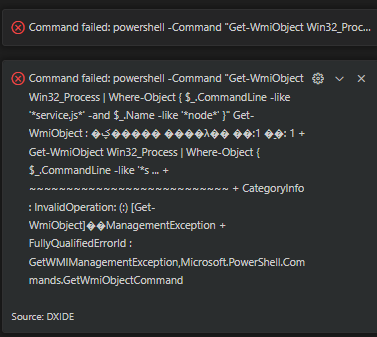
This indicates that the Windows WMI (Windows Management Instrumentation) service on your computer is unavailable or corrupted. The IDE relies on WMI to detect and manage connected devices via USB.
What is WMI? WMI is a core component of the Windows operating system used for management and monitoring. It can become corrupted due to system updates, software conflicts, or registry issues.
Solution:
You need to reset the WMI repository. Please follow these steps:
- Open Command Prompt (cmd) or PowerShell as Administrator.
- Run the following command:
winmgmt /resetrepository - Restart your computer (optional but recommended) and try connecting again.