Smart Locker System (Offline Version)
A complete smart locker management system built for embedded devices using the DejaOS platform. This application provides a user-friendly interface for storing and retrieving items from lockers, along with comprehensive administrative controls.
Unlike demo examples in the Features section, this is a fully functional application ready for deployment. Simply customize UI elements and configurations to match your branding, and it's ready to go live.
This is the offline version of the Smart Locker System. It operates completely independently without any network connection or centralized management - all operations are performed directly on the device. An online version with cloud connectivity and facial recognition support is planned for future release.
Application Screenshots
The screenshots below are from the Chinese version of the UI. However, the source code has been fully updated with English fonts, English interface text, and English comments.
| Interface | Preview |
|---|---|
| Main Interface | 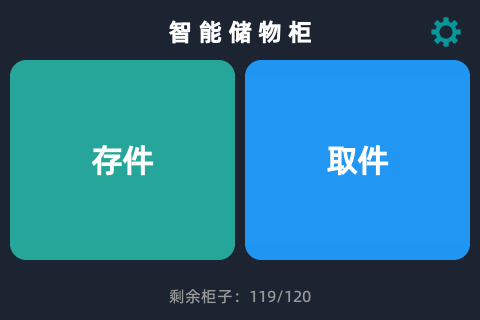 Home screen displays available lockers and provides quick access to Store and Pick functions. |
| Admin Home | 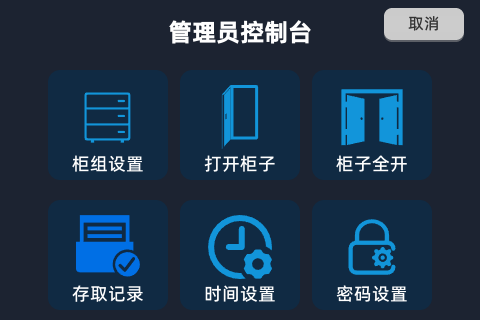 Admin panel with comprehensive management tools. |
| Group Config | 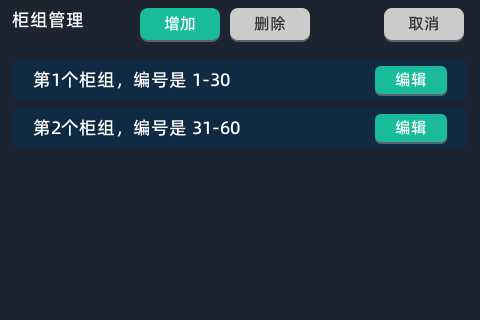 Configure multiple locker groups with custom cabinet ranges. |
| Group Edit |  Edit locker group settings and cabinet assignments. |
| Open All Cabinets | 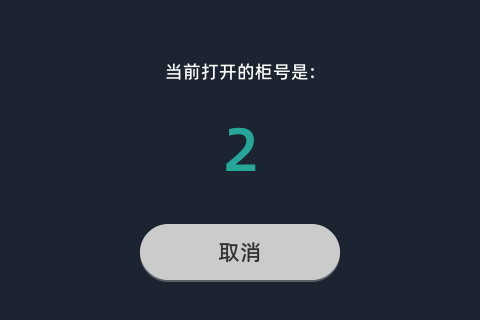 Batch operation to open all cabinets at once. |
| Access Records | 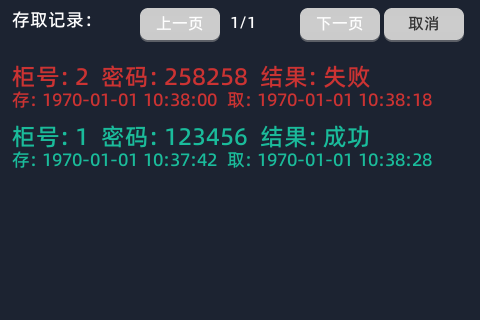 View paginated history of all store/pickup operations. |
Project Overview
This Smart Locker application is a fully functional embedded system designed for the DW200_V20 device. It features:
- User Interface: Intuitive touchscreen interface for storing and picking up items
- Administrative Panel: Complete management system for locker configuration, records, and settings
- Hardware Integration: Direct communication with lock control boards via RS-485
- Data Persistence: SQLite database for storing locker status, records, and configurations
- Multi-worker Architecture: Separated UI, business logic, and hardware communication workers
AI-Generated Application
This entire application was generated through AI-assisted development.
This project was created through 100+ conversations with AI assistants, demonstrating the power of AI in full-stack embedded application development. The AI primarily referenced the development guide in .prompt/main.md and the JS component source code in the dxmodules directory.
The AI was able to generate:
- Complete UI pages with proper layout and event handling
- Business logic for locker operations (store, pickup, admin functions)
- Database schema and data access layer
- Hardware communication protocols (RS-485 lock board protocol)
- Multi-worker architecture with event-based communication
- Error handling and user feedback systems
Main Features
User Features
- Store Items: Select an available locker, set a 6-digit password, and store items
- Pick Items: Enter cabinet number and password to retrieve stored items
- Real-time Status: View available locker count on the home screen
- Countdown Timers: Automatic timeout for user operations
Administrative Features
- Locker Group Management: Configure multiple locker groups with custom ranges
- Manual Cabinet Control: Open individual cabinets or all cabinets at once
- Access Records: View paginated history of all store/pickup operations
- Time Settings: Manual system time configuration
- Password Management: Set and change administrator password
- Super Admin Access: UUID-based super admin password for emergency access
Project Structure
The complete source code for this application can be found here: GitHub Source Code
The application adopts a multi-worker architecture for separation of concerns:
smart_locker_offline/
├── app.dxproj                 # Project configuration
├── dxmodules/                  # dejaOS modules (auto-downloaded)
├── resource/                   # Application resources
│   ├── font/                   # Font files for UI text
│   └── image/                  # UI icons and images
├── src/
│   ├── main.js                # Application entry point
│   ├── uiWorker.js            # UI worker entry
│   ├── lock/                   # Lock control module
│   │   ├── lockWorker.js      # Lock hardware worker
│   │   ├── LockBoardProtocol.js  # RS-485 protocol
│   │   ├── LockerDB.js        # Database layer
│   │   └── LockerService.js   # Business logic
│   └── pages/                  # UI pages
│       ├── UIManager.js       # Page stack manager
│       ├── HomePage.js        # Main interface
│       ├── admin/             # Admin pages
│       └── user/              # User pages
└── .prompt/
    └── main.md                # Development guide (AI reference)
Worker Architecture
- Main Thread (
main.js): Hardware initialization (PWM, GPIO), database initialization, worker creation and coordination - UI Worker (
uiWorker.js): All UI rendering, user interaction, page navigation and lifecycle management - Lock Worker (
lockWorker.js): RS-485 serial communication, lock board protocol handling, hardware command execution
Core Technologies
- DejaOS UI System: Build native smooth interfaces using the
dxUiseries of components - EventBus & RPC: Cross-worker messaging and communication
- dxSqliteDB: SQLite database for persistent storage
- dxUart: Serial communication (RS-485) for lock control
- PWM Driver: Audio feedback via buzzer
- dxMap: Shared memory across workers
Database Schema
The application uses three main tables:
- config: System configuration (admin password, etc.)
- cabinet_status: Current status of each locker (occupied, password, timestamps)
- records: Historical records of all store/pickup operations
Hardware Requirements
- Device: DW200_V20
- Display: Touchscreen (480×320 resolution)
- Serial: RS-485 interface for lock control board
- Audio: PWM buzzer for user feedback
Getting Started
- Open the project in VSCode with DejaOS extension
- Ensure
app.dxprojis configured correctly - Click "Install" in the DejaOS extension to download required modules
- Deploy to target device
Initial Configuration
- Locker Groups: Configure locker groups via Admin Panel → Groups
- Admin Password: Set administrator password via Admin Panel → Admin PIN
- System Time: Configure time via Admin Panel → Time Settings
Tip: This application is designed for the DW200_V20 device with a screen resolution of 480×320. Most interface layouts and image resources are optimized for this resolution. While the core business logic is cross-device compatible, UI adaptation is required for devices with different resolutions.
This project demonstrates the feasibility of AI-assisted development for embedded systems. The entire codebase, architecture, and implementation were generated through iterative AI conversations, showcasing the potential of AI in complex software development scenarios.