Video Intercom UI Demo
This example demonstrates the UI interaction flow for a video intercom and access control system. It utilizes dxFacial for face capture and real-time display, showcasing the various pages involved in the basic steps of a video intercom process.
This example is only a demo for the visual intercom UI. The actual core video intercom functionality has not been released yet and will be introduced in future versions.
UI Preview
Below are screenshots of the example running on a device:
| Main Interface (Main) | Call Interface (Call) |
|---|---|
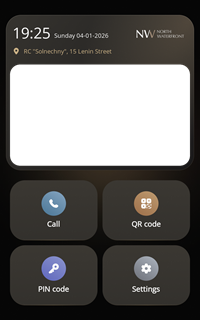 | 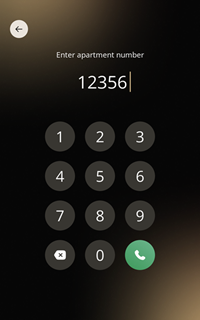 |
| Note: The blank area in the middle of the main interface is the real-time face display area. Due to hardware limitations, screenshots cannot capture real-time frames. | Simulates interaction with residents or the management center. |
| Pin Interface (Pin) | Connection Interface (Connection) |
|---|---|
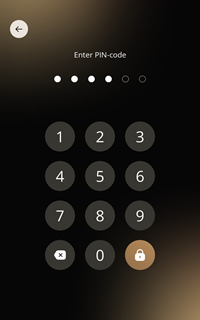 | 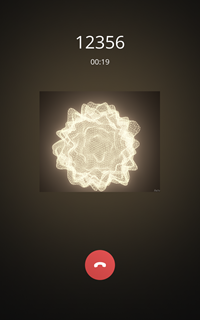 |
| Visitors or residents unlock via the numeric keypad. | Displays system network and backend service connection status. |
Features
- Multi-page UI Navigation: Includes Main, Call, Pin, and Connection pages.
- Real-time Face Capture & Display: Implements face collection through the
dxFacialmodule, with real-time rendering in a designated UI area. - Facial Recognition Integration: Runs the facial engine in an independent Worker thread to handle algorithmic logic without compromising UI smoothness.
- Multi-thread Architecture:
- Main Thread: Responsible for UI initialization and logic scheduling.
- Camera Worker: Handles data collection and algorithm processing via
dxFacial.
Source Code Explanation
The complete source code for this example can be found here: GitHub Source Code
The main file structure is as follows:
main.js: Application entry point, starts camera-related Workers and initializes the screen.screen.js: Screen management module, handles UI framework initialization and view component loading.faceworker.js: Facial recognition and capture logic running in an independent thread.view/: Contains specific implementations for each page (e.g.,mainView.js,callView.js, etc.).
Tip: This example is designed for the VF105 device with a screen resolution of 800*1280. Most interface layouts and image resources are optimized for this resolution. While the core business logic is cross-device compatible, UI adaptation is required for devices with different resolutions.