NFC Demo
This is an NFC card reading demo application built on DejaOS. It demonstrates hardware interaction, UI management, and data processing in a multi-threaded environment.
Application Screenshots
| Status | Preview |
|---|---|
| No Card Present | 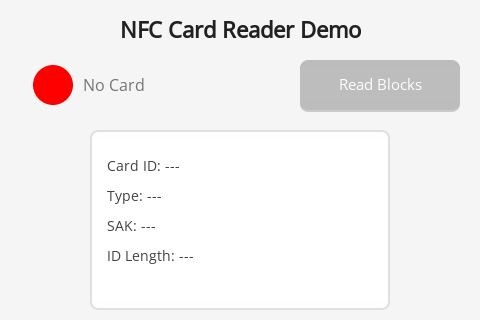 Initial interface after application startup, showing "No Card" status. |
| Card Detected | 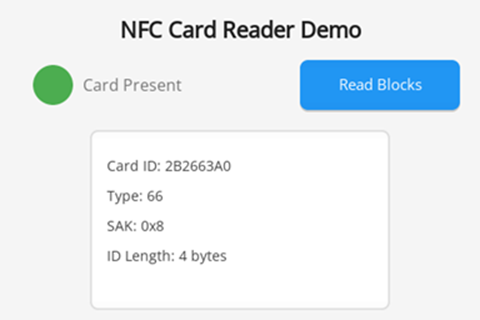 After placing a card, the interface updates card ID, type, SAK, and other information in real-time. |
| Reading Data | 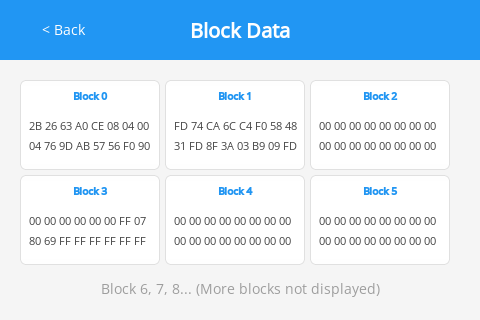 After clicking "Read Blocks", the original hexadecimal content of the first 6 data blocks of the card is displayed. |
Main Features
- Real-time Sensing: Automatically monitors the approach and departure of NFC cards.
- Information Extraction: Displays card UID, type (e.g., Mifare One), SAK value, and its ID length.
- Buzzer Feedback: The hardware buzzer emits a short beep when a card is successfully detected.
- Sector Reading: Reads and displays formatted data block content of M1 cards through RPC calls.
Project Structure
The complete source code for this example can be found here: GitHub Source Code
The application adopts a multi-threaded (Worker) architecture, ensuring UI smoothness and independence of hardware operations:
src/main.js: Main Thread Entry. Responsible for starting the UI and NFC worker threads.src/uiWorker.js: UI Thread. Handles interface rendering, page switching logic, and the event loop.src/nfcWorker.js: Hardware Thread. Directly drives the NFC chip, handles card polling, and communicates with the UI thread via EventBus or RPC.src/pages/:HomePage.js: Main control panel, displaying real-time status.BlockDataPage.js: Detail page, handling RPC requests for block data and its display.
src/UIManager.js: Custom UI management framework, supporting page registration, lifecycle callbacks, and routing.dxmodules/: Hardware driver libraries and core utility classes.
Core Technologies
- DejaOS UI System: Build native smooth interfaces using the
dxUiseries of components. - EventBus & RPC: Efficient communication mechanism across threads.
- PWM Driver: Control the hardware buzzer to implement interaction feedback.
- dxNfcCard: Encapsulates the underlying NFC/M1 card operation protocols.
Instructions
- After starting the application, the main interface displays a red "No Card" status.
- Bring a compatible NFC card (such as an M1 card) close to the device's sensing area.
- After hearing the "beep", the interface will turn green and display card information.
- Click the "Read Blocks" button to enter the detail page and view data.
Tip: This example is designed for the DW200 device with a screen resolution of 480*320. Most interface layouts and image resources are optimized for this resolution. While the core business logic is cross-device compatible, UI adaptation is required for devices with different resolutions.
Due to screen size limitations, this application currently only displays the content of the first 6 data blocks of the card and does not include card writing functions such as modifying block data.